Thursday, March 8, 2012

Rubric for Rover Project

Awards for
  • Fastest Acceleration (3 trials average)
  • Furthest Distance Traveled (3 trials average)
  • Top Average Speed (3 trials average)
  • Vote for Best Design
8th grade NASA ROVER DESIGN CHALLENGE RUBRIC
PHASE  I.  DESIGN PHASE
Pts
CRITERIA

Mission statements
20
·         Statement of purpose
·         Goals of mission are clear and accurate
·         List and explanation of scientific instruments to be used


Work log /Blog**
20
You keep track of your daily accomplishments, learning, and individual work done – signed off by team leader and/or teacher
(photo log on team blog is evidence of work done)

Design of rover
30
·         List of materials included
·         3 views of your design (top, side, oblique)
·         Labeled parts
·         Design includes logo
·         Includes scientific instruments
·         TO SCALE**

Slogan/Logo
20
·         Creative, appropriate, relevant, colorful and DIGITAL –
·         Emailed to Mr. S          jsneideman@tarbut.com
·         Included on your blog
·         Theme song **


Kindergarten Project 1
20
·         You have something prepared for your kindergarten team members to work on when you present the topic.  (coloring which will be included on the final project)

PHASE II. BUILDING PHASE
Building (daily grade)
20
Points will be taken off of the entire team members are idle.  Needs to be evidence of progress daily.

Finished design resembles design
20
The percent similarity of your prebuilding design and your finished project.

Finished project
50
·         Solidly built – not falling apart
·         creativity
·         Moves down a hill by the force of gravity and or with a push
·        

Presentation to the board
50
·         3-5 minute presentation
·         Clearly demonstrates knowledge about

Kindergarten Project 2
20
TBA

PHASE III. EXPERIMENTING PHASE
Newton’s Law Lab
50
TBA

Lab Report
50
Complete lab report : Includes all sections from lab rubric

Finished **Blog of Progress
50
TBD

Kindergarten Project 3
20
Presentation

Other


Tuesday, February 14, 2012

Study Guide Chapter 19


Study Guide Test on Chapter 19.
Understand the phases of the moon.
Understand the H-R diagram
Understand the temp/color/composition of stars
Understand the difference between galaxy types
Understand the big dipper is like a clock and how to read that clock.
Know how to use a star tracker.
Explain the life cycle of a star depending on its starting mass.
Know galaxy worksheet - basics of galaxies and black holes and super galaxies
Understand the meaning of each variable in the Drake equation.  F sub capital L?

Essay: Explain the cuases of the seasons in detail.  Give examples using the Poles and Tropic Lines.

Spectrum
Apparent magnitude
Absolute magnitude
Light-year
Parallax
H-R diagram
Main sequence
White dwarf
Red giant
Supernova
Neutron star
Pulsar
Black hole
Galaxy
Spiral galaxy
Elliptical galaxy
Irregular galaxy
Nebula
Open cluster
Globular cluster
Quasar
Gibbous
Crescent
Waxing
Waning
Solstice
Equinox
Aphelion
Perihelion
Angular Heigth of the Sun


Honors:
·         Math using speed of light and scientific notatio
·         Math calculating the distance and time to travel to certain stars or size and distance between galaxies calculated.
·         Use the Drake equation given certain variables
·        What is Dark Matter and Dark Energy?


Do Now: Stars Spectra

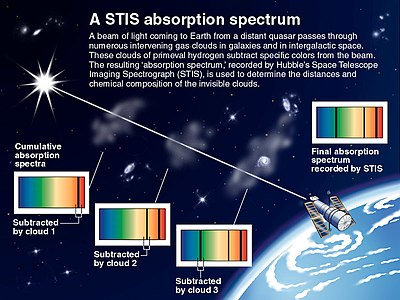
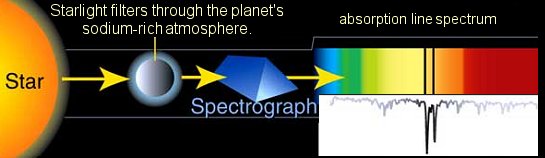
What does the surface color of a star tell us? Explain in detail. Then explain what is an absorption spectra.


Sources of continuous, emission, and absorption spectra


Sources of continuous, emission, and absorption spectra


http://csep10.phys.utk.edu/astr162/lect/light/absorption.html
Thus, emission spectra are produced by thin gases in which the atoms do not experience many collisions (because of the low density). The emission lines correspond to photons of discrete energies that are emitted when excited atomic states in the gas make transitions back to lower-lying levels.

A continuum spectrum results when the gas pressures are higher. Generally, solids, liquids, or dense gases emit light at all wavelengths when heated.

An absorption spectrum occurs when light passes through a cold, dilute gas and atoms in the gas absorb at characteristic frequencies; since the re-emitted light is unlikely to be emitted in the same direction as the absorbed photon, this gives rise to dark lines (absence of light) in the spectrum.

Friday, January 20, 2012

Blogging in Class


Blogging

Uses: Projects, journals, embed videos, keep track of conversations, post news articles, post homework, post review sheets, etc.


www.blogger.com (blogger is accessed through your gmail account. If you have a gmail then you can just login as yourself. If you don't then I have created an account for you.) When I use blogs in class, I have all students use a gmail account that I have created just for the purpose of the project – this gives me control over the content such that if an issue ever arose, I could go in and edit or delete a blog )

login: tvtscience2@student.tarbut.com

password – tvtentropy


Post Vs. Page – both can be changed at any time using the pencil or edit.

*you can also change the order of your posts by editing just the date box.

-posts move down the page in chronological order each new post at the top.

-Pages are static entities that in senescence act as a single post. They can be edited to make additions or changes whenever you like.


How to make a new page

Click – new post – then edit pages – then new page – then it asks you to name a location – I like my pages at the top of the page.


How to make a new post – click new post –

There is a edit HTML tab and a compose tab – when working in word click the compose tab. When working with embedding video click the edit HTML tab to copy and paste-


Embedding a YouTube Video

To embed a video from YouTube, just follow these simple steps:

  1. Click on the "Share" button underneath the YouTube video.
  2. Select "Show more," and then click on the Blogger icon.
  3. Depending on whether or not you're signed in to your blog, you might have to enter in your username and password in the new window that pops up.
  4. At the top of the new window, choose the blog you would like to post to from the drop-down menu.
  5. Publish your post!

*THIS IS THE METHOD I USUALLY USE***

Alternatively, you can copy the embed code and paste it into your blog. Just click on "Share" and then on "Embed" to find the embed code. Copy the code, then paste it into your blog while on the "Edit HTML" tab (as opposed to the "Compose" tab).

Posting pictures

You can now upload photos to your blog(s) using Blogger Images; just click the image icon in the post editor's toolbar.


When you click this icon, you'll get a window that allows you to select an image or multiple images from your computer. Click the Browse button to locate the ones you want. Alternatively, you can enter the URL of an image that's already online and insert it into your post.


If you click the link to choose a layout, you can customize the way your images will appear in your post:


The left, center and right options determine how the text of your post flows around the pictures. The size option lets you scale the pictures to different sizes within this posting area. Note that the picture will still be uploaded in its full size; this option just determines how it's scaled within the content of your post.


Adding an RSS Feed:

RSS stands for really simple syndication – they are generally sites that are updated regularly.

In the design tab – choose add a gadget – then scroll down to the RSS Feed gadget.

Copy and paste in the address for the RSS feed. Ex: Science News Daily –

RSS feeds normally look like one line of a web address.

You could always Google search your topic and RSS


WORKING DIRECTLY FROM WORD Document without ever having to log in. You can also open old files and just send them directly to your blog.

On word when you choose FILE NEW- you can choose blogpost.

  • Choose manage accounts – enter the data necessary to have your accounts accessible from word. You can just post straight from word. WORD!
  • All you need do is copy and paste the document into a blogpost and click submit


Ideas for blogs:

Post homework, review sheets 

Post videos and have students comment 

Post student work 

Post interesting photos of art and have students comment 

Post youtube videos of different parts of a song 

Post garage band performances 

Post links for research projects

Post math word problem of the day 

Post photographs from classroom reenactments 

Post links to current events 

Post links to podcasts about a certain topic 

Have students keep a journal about…. 

Have students keep their science log about….

Have students create a awareness about….. 

Have students collaborate about….. 


Notes: